FAQ’s

Realtor.com® and CCAR have launched a new strategic partnership, driven by a shared vision: elevating the role of the professional by equipping you with powerful, cutting-edge tools.
The first product delivered from this powerful collaboration is Realtor.com+: a collaborative home search for professionals and clients that helps them stay in sync from click to close.
What are the Benefits of Realtor.com+?
Realtor.com+ offers a best in class collaboration experience for practitioners and their clients from search-to-close. For your clients, this means accessing the Realtor.com experience they know and love (a modern platform with nationwide search) with the addition of premium features, like shared listing feeds so they can easily collaborate with you and any co-buyers.
For you, this means access to an entire suite of premium features to that elevates your role as the professional, keeping you as the hero of the transaction, including, but not limited to features such as:
- Protected and branded environment
- Create saved searches for you AND your clients using MLS-level search filters
- Collaborative agent-client search with co-buyers & co-agents
- Visibility into your clients’ search behaviors (saves, property views, sessions, likes/dislikes, etc)
- In-App Chat with Agent Reminders
- Touring Solution
- Agent & Client Mobile Apps
- Real-Time Client and Market Insights
So this is an app?
Realtor.com+ is a platform available via both desktop and mobile app (for iPhone or Android). Whatever you do on Realtor.com+ syncs across all platforms.
For example, if you save a search while on your computer, you can get notified on your phone from the mobile app when new listings match it! This allows you to do your work wherever you are, whether you’re at your desk or waiting on a front stoop for your buyer to arrive for a showing.
How do I get the app?
You can download the app by searching for Realtor.com+ on the App or Google Play Store. Just look for the Realtor.com+ logo to be sure you’re downloading the correct app.
Download Realtor.com+ on Apple:
https://apps.apple.com/us/app/realtor-com-plus/id6749579971
Download Realtor.com+ on Google Play:
https://play.google.com/store/apps/details?id=com.move.realtorplus.android&utm_source=na_Med
Once you’ve downloaded the app, follow the steps on the app screen to sign into your account.
Where do I manage my Realtor.com+ plan?
You can manage your Realtor.com+ plan inside of your Account Page, under the section called “My Subscription.” Once in the “My Subscription” section of your account, you can upgrade or downgrade your plan, manage your credit card on file, and see a full list of features available to you in each plan.
Will I have the ability to gain more benefits through Realtor.com+ if I’m a paid Realtor.com customer?
At this time, there are no paid add-ons for Realtor.com+. While we wholeheartedly believe agents significantly increase their opportunity for success by becoming a Realtor.com customer, it’s not necessary to successfully take advantage of Realtor.com+ and all the tools and insights it has available.
How do I describe Realtor.com+ to my clients?
Shortly before or after you invite a client to Realtor.com+ we recommend giving the client a quick 1-2 minute elevator pitch to remind them of the value of joining you. To name a few of those benefits, you can call attention to:
- Advanced collaboration features unlocked within your existing Realtor.com experience.
- Cross-compatible web and mobile experience within their existing Realtor.com app.
- In-app chat messenger to collaborate, share feedback, and stay connected with me, and if applicable, your co-buyer.
- Request tours with me directly, and see past and upcoming showings.
- No ads in-app, so you can focus on what matters most – finding your dream home.
- And much, much more!
Below is some inspiration to help you get started:
What MLS data will I see on Realtor.com+?
Realtor.com+ is a platform available via both desktop and mobile app (for iPhone or Android). Whatever you do on Realtor.com+ syncs across all platforms.
For example, if you save a search while on your computer, you can get notified on your phone from the mobile app when new listings match it! This allows you to do your work wherever you are, whether you’re at your desk or waiting on a front stoop for your buyer to arrive for a showing.
How do I sign up?
More details to come soon!
Do I have to pay a subscription fee?
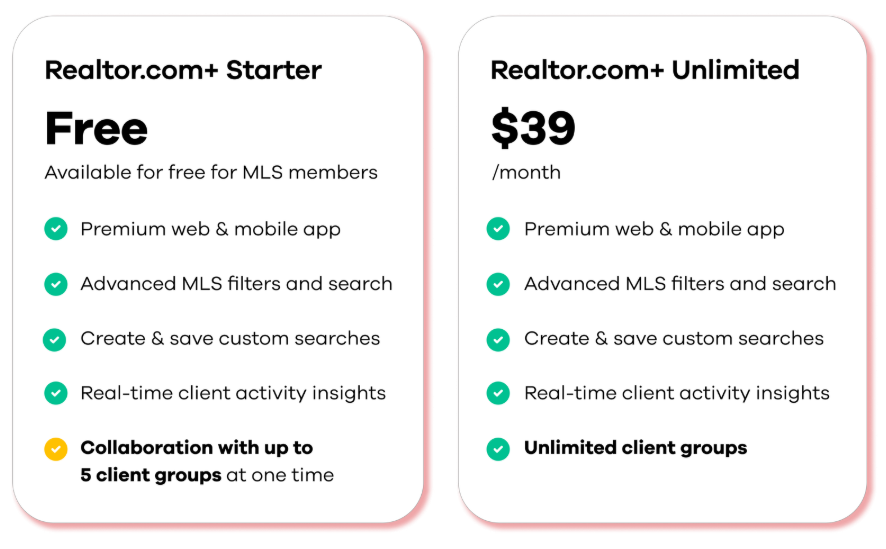
Realtor.com+ offers two different plans and pricing options so that you can choose which is best for you and your clients:
- Realtor.com+ Starter – Free for Contra Costa REALTORS® members!
- Realtor.com+ Unlimited – $39/month
What’s included in each plan?
The only difference between Realtor.com+ Starter and Realtor.com+ Unlimited is the number of active client groups that you can be connected with at any given time.
How is this different from Realtor.com?
Realtor.com+ takes you and your clients beyond a simple search with enhanced collaboration tools built to simplify the way you and your clients work together. In addition to a protected environment, you and your clients will have access to collaboration tools that include direct chat messages, behavior alerts, tour management, market insights, and more!
I received an email about Realtor.com Pro, Connections Plus what’s the difference?
The Realtor.com leads businesses (Connections Plus, MVIP) will continue to exist and will continue to offer leads to professionals who rely on them to grow and power their businesses. Realtor.com+ is a post-lead experience. It is for clients and agents who have already chosen to work together – for the serious buyers in the transaction phase of the journey.
Subject: Heads up! How we’ll search together to find your dream home.
Body:
Hi [Client Name],
As you get ready to start your home search, I want to introduce you to Realtor.com®+™ a smart home search platform designed specifically for my valued clients to find their way home.
Why You’ll Love Realtor.com+:
- My Expert Guidance: Always On. You’ll connect with me in a premium search environment where you’ll be able to view my recommended homes for you, invite your co-buyer, share individual listings, see your upcoming tours, and chat with me all in one space, so you never miss a critical update.
- Seamless Collaborative Search & Communication. Once you’re connected with me on Realtor.com+, you’ll receive real-time listing updates for our saved searches and you’ll have a direct line to me to chat and request tours instantly, so we can move quickly together.
- Available on Web and Mobile. Realtor.com+ is available to use on your computer or on the go via the Realtor.com mobile app, so you can search and communicate with me from anywhere.
Next Steps:
We will be using Realtor.com+ as our primary search and collaboration hub throughout your home search. Realtor.com+ is an exclusive, invite only platform so…
Please keep an eye on your inbox!
I will be sending your invitation to join Realtor.com+ shortly. Look for an email from Realtor.com+ with the invitation link. Once you receive it, please click the link to join me right away so we can jump in and get started!
How do my clients access Realtor.com+?
Easy! Once your clients connect with you on Realtor.com+ by accepting your invitation, if they get logged out of the Realtor.com+ experience, they’ll simply sign back into their account at www.realtor.com or on the Realtor.com app.
Once they’ve signed in, their traditional Realtor.com experience will be automatically upgraded to the premium Realtor.com+ experience they receive by working with you. There is no additional app or separate website they’ll need to go to work with you!
How do get support?
We’re always happy to help. You can get in touch with our support team at any time by selecting the Support button in your Realtor.com+ account.
You’ll also have access to your knowledge center, which provides a variety of helpful product walkthroughs and how-to guides to help you get started. You can access the knowledge center using the link, here.
How will I learn how to use Realtor.com+?
Learn how to use your Realtor.com+ account by joining an upcoming live or virtual training session. Dates and times are actively being scheduled and will be communicated broadly once established.
I received an email about Realtor.com Pro, Connections Plus what’s the difference?
Yes! You can use the co-agent feature to add another agent or team member to one of your client feeds, as long as the agent has a Realtor.com+ account. Your partner agent will be able to see the saved searches and listings on the client feed and add their own saved searches as well.
Learn more about working with your team here.


 CCAR is proud to be a RESO Platinum Certified MLS, the highest level of certification available.